Monday, 26 November 2012

Software Engineering Framework

Software Engineering Framework

Any Engineering approach must be founded on organizational commitment to quality. That means the software development organization must have special focus on quality while performing the software engineering activities. Based on this commitment to quality by the organization, a software engineering framework is proposed that is shown in figure 2. The major components of this framework are described below.

Quality Focus
As we have said earlier, the given framework is based on the organizational commitment to quality. The quality focus demands that processes be defined for rational and timely development of software. And quality should be emphasized while executing these processes.

Processes
The processes are set of key process areas (KPAs) for effectively manage and deliver quality software in a cost effective manner. The processes define the tasks to be performed and the order in which they are to be performed. Every task has some deliverables and every deliverable should be delivered at a particular milestone.

Methods
Methods provide the technical view to carryout these tasks. There could be more than one technique to perform a task and different techniques could be used in different situations.

Tools
Tools provide automated or semi-automated support for software processes, methods, and quality control.

The Balancing Act!

Software Engineering is actually the balancing act. You have to balance many things like cost, user friendliness, Efficiency, Reliability etc. You have to analyze which one is the more important feature for your software is it reliability, efficiency, user friendliness or something else. There is always a trade-off among all these requirements of a software. It may be the case that if you try to make it more user-friendly then the efficiency may suffer. And if you try to make it more cost-effective then reliability may suffer. Therefore there is always a trade-off between these characteristics of software.
 
These requirements may be conflicting. For example, there may be tension among the following:
  • Cost vs. Efficiency
  • Cost vs. Reliability
  •  Efficiency vs. User-interface
A software engineer is required to analyze these conflicting entities and tries to strike a balance.

Well Engineered Software

Well-Engineered Software

Let’s talk something about what is well-engineered software. Well-engineered software is one that has the following characteristics.
  • It is reliable
  • It has good user-interface
  • It has acceptable performance
  • It is of good quality
  • It is cost-effective
Every company can build software with unlimited resources but well-engineered software is one that conforms to all characteristics listed above.
 
Software has very close relationship with economics. Whenever we talk about engineering systems we always first analyze whether this is economically feasible or not. Therefore you have to engineer all the activities of software development while keeping its economical feasibility intact.
 
The major challenges for a software engineer is that he has to build software within limited time and budget in a cost-effective way and with good quality

Therefore well-engineered software has the following characteristics.
  • Provides the required functionality
  • Maintainable
  • Reliable
  • Efficient
  • User-friendly
  • Cost-effective
But most of the times software engineers ends up in conflict among all these goals. It is also a big challenge for a software engineer to resolve all these conflicts.

Software Engineering Introduction

What is Software?

When we write a program for computer we named it as software. But software is not just a program; many things other than the program are also included in software.
Some of the constituted items of software are described below.

Program
The program or code itself is definitely included in the software.

Data
The data on which the program operates is also considered as part of the software.

Documentation
Another very important thing that most of us forget is documentation. All the documents related to the software are also considered as part of the software.

So the software is not just the code written in Cobol, Java, Fortran or C++. It also includes the data and all the documentation related to the program.

Why is it important?

Undoubtedly software is playing a vital role in all the field of life these days. We can see many software applications being operated around us in our daily routine.
Some of the major areas in which software has played an important role are identified as under.

Business decision-making
Software systems have played a major role in businesses where you have to analyze your data and on the basis of that analysis you have to make business decisions. This process of data analysis and decision-making has become very accurate and easy by the use of software.

Modern scientific investigation and engineering problem solving
Scientific investigations and engineering problem solving require an intensive amount of calculations and data analysis. The accuracy of these analyses is also very important in scientific applications. This process has become very easy and accurate by the use of software. For example software systems are becoming more involved in bioinformatics and the process of DNA decoding is only possible by the use of software systems. Similarly many astronomical observations are being recorded and analyzed by the software systems these days.

Games
We see many computer games these days that interests people of all ages. All these games are drive through software systems.

Embedded systems
We see many kinds of gadgets being employed in our daily used things, like small microcontrollers used in our cars, televisions, microwave ovens etc. All these systems are controlled through the software.

Similarly in many other fields like education, office automation, Internet applications etc, software is being used. Due to its central importance and massive use in many fields it is contributing a lot in terms of economic activity started by the software products. Billions and trillions of dollars are being invested in this field throughout the world every year.

Engineering

Before moving on to software engineering lets first discuss something about engineering itself. If you survey some of the dictionaries then you will find the following definition of engineering.

“The process of productive use of scientific knowledge is called engineering”.

The science concerned with putting scientific knowledge to practical use. Webster’s Dictionary
There are many engineering fields like electrical, mechanical and civil engineering. All these branches of engineering are based on physics. Physics itself is not engineering but the use of physics in making buildings, electronic devices and machines is engineering. When we use physics in constructing buildings then it is called civil engineering. When we use physics in making machines like engines or cars then it is called mechanical engineering. And when we apply the knowledge of physics in developing electronic devices then the process is called electrical engineering. The relation of computer science with software engineering is similar as the relation of physics with the electrical, mechanical or civil engineering or for that matter the relation of any basic science with any engineering field. So in this context we can define software engineering as: “This is the process of utilizing our knowledge of computer science in efective production of software systems”.

Difference Between Software and Other Systems

Now lets talk something about how a software system is different from any other systems. For example, how software is different from a car, a TV or the similar systems or what is the difference between software engineering and other engineering like mechanical or electrical engineering. Lets look at some of the non-software systems like TV, Car or an Electric Bulb. The car may be malfunctioned due to some problem in engine while driving. Similarly an electric bulb may be fused while glowing and a TV could be dysfunctional while working. So the major thing that distinguishes a software system from other systems is that;

“Software does not wear out!”

What does that mean?

As we have seen in above example that our non-software systems could be malfunctioned or crash while working. That mean they are affected by the phenomenon of wear and tear. They have a particular life and after that they could have some problem and may not behave and perform as expected. But this is not the case with software. Software systems does not affect by the phenomenon of wear and tear. If a software has any defect then that defect will be there from the very first day and that defect normally called bug. That means if a software is not working then it should not work from the very first day. But this could not be the case that at a particular point in time a software is functioning well and after some time the same software is not performing the same task as required. So software does not have the element of wear and tear. Lets elaborate this point further. We have just talked about software defects which we call bugs. If a part of a car became wear out you just need to get a new one from market and replace the damages one with the new one. And the car will start working properly as it was working previously. Similarly if an electric bulb got fused then you just need to get a new one and put into the socket in place of the fused one and your room will again be illuminated. But the case of software is somewhat different. If a software has a bug then the same process of replacing faulty part with the new one may not work. You cannot remove the bug by just replacing the faulty part of software with the new one. Or it will not be as simple that, you go to the concerned company, get a new CD of that software and it will start working properly. If the software has a bug and that bug was present in the older CD then that will remain in the new one. This is a fundamental difference between a software and other systems.

What is Software Crisis?

Computer systems were very new and primitive in early fifties and the use of software was also very limited at that time. It was limited to some scientific applications or used to process the data of census. In 1960s a great amount of rapid improvement was made in hardware. New hardware and new computer systems were made available. These computer systems were far more powerful than the computers of early fifties. It is all relative, the computers of 1960s are primitive as compare to the computers we have these days but were far more powerful than the computers of early fifties. More powerful hardware resulted into the development of more powerful and complex software. Those very complex software was very difficult to write. So the tools and techniques that were used for less complex software became inapplicable for the more complex software. Lets try to understand this with the help of an example. Lets imagine a person who use to live in a village and who have constructed a hut for him to live. Definitely he should have face some problems in the beginning but was managed to build a hurt for him. Now if you ask him to construct another hut, he may be able to construct one more easily and in a better way. This new hut may be better than the first one and he may construct it in a relatively less time. But if you ask him to construct concrete and iron houses then he may not be able to handle it. Since he made a hut and he know how to make a place to live so you may expect from him to build concrete and iron buildings. If this is the case then you should all agree that the building constructed by that person will not have a stable structure or he may not even be able to build one.

In early 60s software had suffered from the similar kind of problem to which we call Software Crisis. Techniques that were used to develop small software were not applicable for large software systems. This thing resulted in the following consequences.
  • In most of the cases that software which was tried to be build using those old tools and techniques were not complete.
  • Most of the times it was delivered too late.
  • Most of the projects were over-budgeted.
  • And in most of the case systems build using these techniques were not reliable – meaning that they were not be able to do what they were expected to do.
As a result of these problems a conference were held in 1960 in which the term software crisis was introduced. And the major issue discussed was that the development of software is in crisis and we have not been able to handle its complexities. And the term of Software Engineering was also coined in the same conference. People have said that, we should use engineering principles in developing software in the same way as we use these principles in developing cars, buildings, electronic devices etc. Software engineering is the result of software crisis when people realized that it is not possible to construct complex software using the techniques applicable in 1960s. An important result of this thing was that people had realized that just coding is not enough.

Software Engineering as defined by IEEE: Lets look at some of the definitions of software engineering.
 
Software Engineering as defined by IEEE (International institute of Electric and Electronic Engineering). IEEE is an authentic institution regarding the computer related issues.
“The application of a systematic, disciplined, quantifiable approach to the development, operation, and maintenance of software; that is, the application of engineering to software.”

Definition of Software Engineering given by Ian Somerville:
“All aspects of software production’ Software engineering is not just concerned with the technical processes of software development but also with activities such as software project management and with the development of tools, methods and theories to support software production”.

Wednesday, 9 May 2012

Major Points, Flounce of C Language,


Major points
o program execution begins at main()
o keywords are written in lower-case
o statements are terminated with a semi-colon (;) called terminator
o text strings are enclosed in double quotes
o C is case sensitive, use lower-case and try not to capitalize variable names
o printf() can be used to display text to the screen and used for output
o sacnf() can be used to store any value in variable and used for input
o the curly braces {} define the beginning and end of a program/function block

Flounce of C Language
Alphabets Constant
Digit Variable Instructions Program
Special Symbol Keywords


Constant
Unchangeable value is called constant. Constants are quantities whose values do not change during program execution. They may be numeric or character.

Numeric Constant
Numeric constants are two types i.e. integer and real constant.
Inter Constants: -Integers represents values that are counted, like the number of students in a class. An integer constant is a string of digits that does not include commas or a decimal point. Some examples of valid integer constant are: 0, 7145, -225, -9528 etc

Rules for Integer Constant
􀂾 An integer constant must have at least one digit.
􀂾 It must not have a decimal point.
􀂾 If no sign precedes an integer constant it is assumed to be positive.
􀂾 No commas or blanks are allowed with in an integer constant.
􀂾 The allowable range for integer constant is -32768 to 32767.

Real Constant (Floating-point Constant)
Real constant are often called floating point constant. The real constants are used to represent values that are measured, like the height of a person which have a value like 166.75 cm. The real constants could be written in two forms, exponential form and fractional form.

Rules for Real Constant
􀂾 A real constant must have at least one digit.
􀂾 It must have a decimal point.
􀂾 It could be either positive or negative default sign is positive.
􀂾 No commas or blanks are allowed with in a real constant.

Rules for Exponential Form
􀂾 The mantissa part and the exponential part should be separated by a letter ‘e’.
􀂾 The mantissa part may have a positive or negative sign.
􀂾 Default sign of mantissa part is positive.
􀂾 The exponential must have at least one digit which must be a positive or negative are integer.
􀂾 Range of real constant expressed in exponential form is 3.4e38 to 3.4e38.

Character Constant
A character constant in one of the symbols in the a character ser. Although this character set may vary one C implementation to another, it includes digits (0-9), alphabets (a to z), symbols etc. a character constant is enclosed by single quotes such a s ’a’.

Rules for Character Constant
􀂾 A character constant is a single alphabet, a single digit or a single special symbol enclosed with in a single Inverted Coma (‘).
􀂾 Both the inverted comas should point to the left.
􀂾 The length of character constant can be one character.

VARIABLE
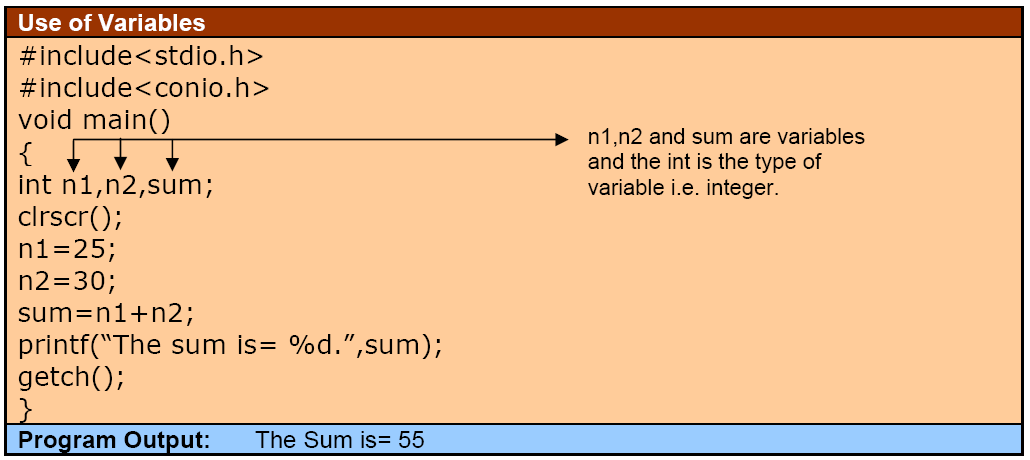
Changeable value is called variable. When a variable is used in a computer program, the computer associates it with a particular memory location. A variable is a space in the computer memory set aside for a certain kind of data and given a name for reference.
Rules for Constructing Variable Name
􀂾 A variable name is any combination of 1 to 8 alphabets, digits or under score.
􀂾 The first character in the variable must be an alphabet or underscore.
􀂾 No commas or blanks are allowed in variable name.
􀂾 No special symbol other than an underscore can be used in a variable name.


KEYWORDS
Keywords are the words meaning has already been explained to the compiler. The keywords cannot be used as a variable name if we do so we are trying to assign a new meaning to the keyword, which are not allowed by the computer. There are only 32 keywords available in C.
(1) auto (2) break (3) case (4) char (5) const (6) continue (7) default (8) do (9) double (10) else (11) enum (12) extern (13) float (14) far (15) for (16) goto (17) if (18) int (19) long (20) near (21) register (22) return (23) short (24) signed (25) static (26) struct (27) switch (28) typedef (29) union (30) unsigned (31) void (32) while.


Basic Structure of C Program


#include<stdio.h>
The # sign indicates that this is an instruction for the C compiler and includes information about how to use the functions from the <stdio.h> stand for Standard Device Input/Output header. Usually the standard input device is your keyboard and the standard output device a terminal which is displayed on your monitor. One item included in this header is a declaration of the function printf(). This library is very widely used.

#include <conio.h>
This line tells C to include information about how to use the functions from the Common Input Output library.

void main()
main() is a program building block called function. C programs contain one or more functions, exactly one of which must be main. The keyword void to the left of the main indicated that main can not return any value. The parentheses after main indicates that main is a program building block called function.
{ the left braces begin the body of every of every function and a corresponding right brace } must means end the body of each function.

clrscr();
It is a built in function for clear screen and as ; (semicolon) at the end of line its means that the statement end with ; all the statements in C are terminated ; (semicolon) called terminator.
printf(“Hello! Students.”);
It is also a built in function of C to interact compiler for print message in console output screen, which are mention with parentheses and double quote.

getch();
It is also a built in function, this function can get any character from user on run time, and mostly this function is used for stop any program on any specific location when user can enter any key then program goes on.

How to Write, Compile, Link and Run the C Program?


We use Turbo IDE that provides the central location where the entire C program that can be written, compile, link and run. Following steps are required for working with Turbo C IDE. By S. Zaffar Iqbal

Step 1: Select the icon/shortcut TC.EXE from the BIN folder present in the TC. This action will open the Turbo C++ IDE (program), where we can perform all the relevant activities associated with the C program. After properly opening the Turbo C IDE, a program with blue color will be appeared on the screen. It is the place where we do our programming work.

Step2: Now write the program.


Step 3: Now Save the file with the name “student.c” by pressing F2, or by selecting the Save option from the File Menu.

Step 4: Now compile the file by pressing the Alt + F9, or by selecting the Compile option of the compile menu (after the successful compilation of .c and object file .obj will be generated).

Step 5: Now link the file by selecting the link option of the Compile menu. After linking the file the .exe will be generated.

Step 6: Instead of Using the Option 4 and 5 directly press F9 or use the Make option of the of the Compiler menu, that which the program is compile and link with the single command.
Step 7: For running the program press Ctrl + F9 or select the Run option from the Run menu. After selecting this option, the Turbo C IDE, will run the program, but before running the IDE compile and link the file automatically, so instead of using the options 4 to 6, simply press the Run or Ctrl + F9, by which the compile, linking, and running process will be perform in a single tern.

Step 8: Since the speed of the computer is so fast, so we view the output Hello Students! Since after displaying the output return the control to the Turbo C IDE. For displaying the output press the Alt+F5.

Step 9: Press Alt + X, or select the Quit option from the File menu, to exit from the Turbo C IDE.